



Banking. Redefined For You.
Discover a smarter way to bank with the New Ubank Digital App. Manage your accounts effortlessly, stay on top of your finances, and access a wide range of banking services anytime, anywhere. Designed for simplicity and convenience, the Ubank Digital App gives you complete control over your banking experience, right at your fingertips. Whether you prefer Conventional or Islamic Banking, the Ubank Digital App is designed to meet your needs seamlessly.
Download Ubank Digital App Now!


Existing users are also required to download the New Ubank Digital App and complete a fresh sign-up to access services. For details: Read FAQs

Account Management
Open Your Account with Ease: Get started quickly with seamless digital onboarding, no branch visit required.
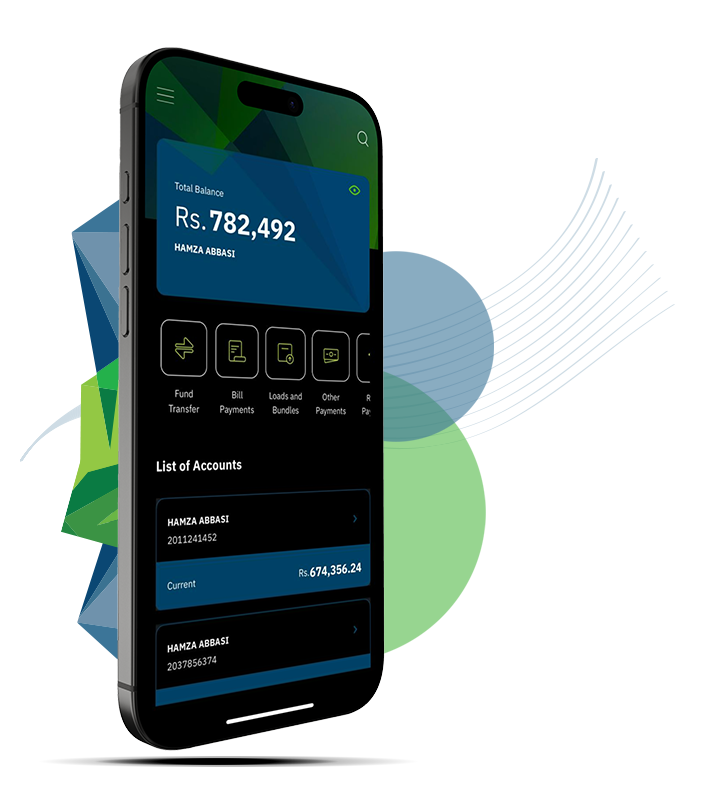
All Your Accounts, One App: View and manage all your U Bank digital accounts from a single, unified dashboard.
Statements on Demand: Check balances anytime and download account statements whenever you need them or have them delivered directly to your email.
Update Your Profile Instantly: Make quick updates to your personal details directly through the Ubank Digital App.
CNIC Expiry Update: If your CNIC has expired, you can easily update your details remotely and securely, anytime, anywhere, through the Ubank Digital App.
Schedule of Charges: View the latest Schedule of Charges anytime, just a tap away.
Offers You Don’t Want to Miss: Stay updated with U Bank’s newest products, promotions, and announcements.
Help, Made Simple: Find quick answers and useful tips with easy-to-use FAQs available within the Ubank Digital App.

Payments & Transfers
Scan. Pay. Done: Pay in seconds with QR codes — just scan and go for quick, smooth, and hassle-free transactions.
Pay All Your Bills in One Place: Settle utility bills and manage recurring payments effortlessly. Set them once and let the Ubank Digital App take care of the rest.
Instant Money Transfers: Send money to U Bank or other bank accounts securely in seconds.
Manage Beneficiaries Easily: Add, edit, and pay beneficiaries smoothly and securely.
Never Miss a Payment: Schedule transactions in advance and let the Ubank Digital App handle timely execution.
Save Your Favorites: Keep frequently used accounts and payments handy for quick, one-tap access.
Apply for Financing Instantly: Submit your financing request right from the Ubank Digital App anytime, anywhere.
RAAST Transfers: Send and receive instant payments using RAAST ID or mobile number.
Security & Authentication
Secure, Your Way: Log in using Face ID, fingerprint, or password for fast and secure access.
Set Your Spending Limits: Customize transaction limits to stay in full control of your finances.
Real-Time Alerts: Receive instant transaction notifications to stay informed and protected.
Device Management: View and manage trusted devices linked to your Ubank digital banking profile.
Experience & Convenience
Light & Dark Mode: Switch between light and dark modes for comfortable viewing at any time.
Find Branches & ATMs Nearby: Locate U Bank branches and ATMs easily with built-in map support.
More Ways to Pay: Make Zakat & donations, pay tickets, manage insurance, complete card payments, and more — all in one place.
Top Up on the Go: Recharge mobile airtime and data bundles instantly, wherever you are.
Card Control: Check balances, activate new cards, or instantly block lost or stolen cards from within the Ubank Digital App.
Channel-Based Card Controls: Enable or disable card usage for ATM, POS, and online transactions.
Card Replacement Request: Request replacement for damaged or expired cards digitally.
Debit Card: Order a debit card for secure ATM & POS transactions.

FAQs
I already have an account. Do I need to sign up again on the new app?
Yes. For security and system upgrade reasons, all existing users are required to register once on the new app. This ensures your account is securely linked to your device and updated authentication standards.
Can I use my old username and password?
No. Passwords from the previous app are not carried forward. During registration on the new app, you will be asked to create a new username ,a new password and MPIN.
How do I start the registration process as an existing user?
Tap Sign Up on the login screen and enter your CNIC/NICOP/POR number, issuance date, and registered mobile number linked to your account. You will then complete verification and set new credentials.
What are the username requirements?
Your username must be 8–64 characters long and can contain letters and numbers.
What are the password requirements?
Your new password must be 8–64 characters long & contain one upper case, one lower case & one number. It should also contain one special character. This password will replace your old one permanently.
What is MPIN and why do I need to create it?
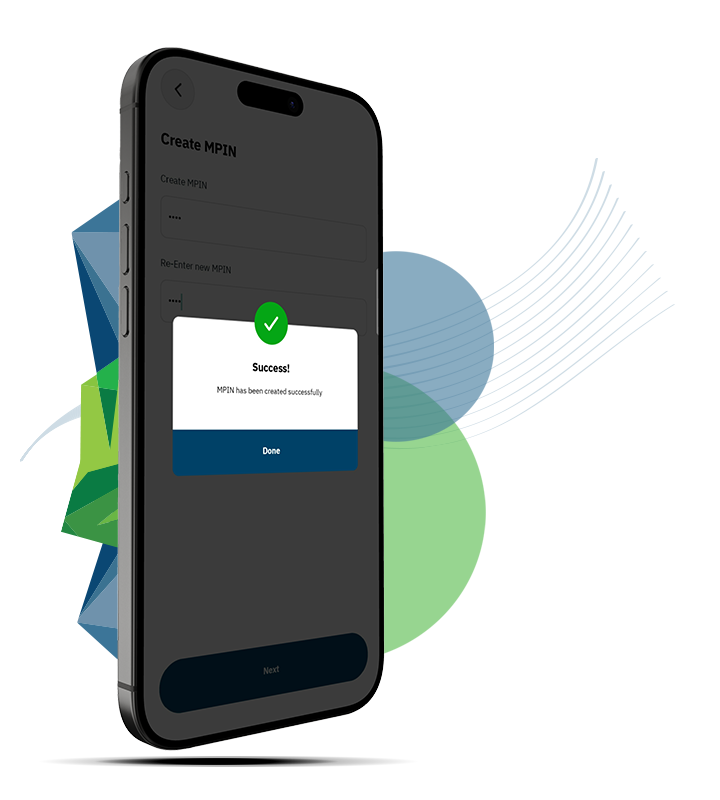
MPIN is a 4-digit security PIN used for quick and secure access to login, financial and non-financial transactions. During registration process you will be prompted to set and confirm your MPIN, which you can use later. You would also have an option to change MPIN from the Ubank Digital App in future.
Will my account be linked to my phone?
Yes. After setting your credentials and MPIN, your device is registered automatically. You can view your last login history thus adding an extra layer of security.
I didn’t receive the OTP. What should I do?
Ensure your mobile number has network coverage and is the same number registered with the bank. If the issue persists, use the resend option or contact customer support.
What should I do after seeing the “Success” message?
Once registration and device setup are successful, tap Done and return to the login screen. You can now log in using your new username and password. First time login you will receive an OTP through SMS. While you can later set your login method with MPIN, bio metric or face recognition.
What if I forget my new password?
Use the “Can’t Login?” option on the login screen to reset your credentials securely through OTP verification.
Is my existing account balance and data safe?
Yes, your account balance will be available & safe in the new app whereas transaction history will be available from the day of migration to the new system. Only the login credentials have been reset to meet enhanced security requirements.
Do I need to repeat this process again later?
No. This is a one-time registration for the new app. Once completed, you will continue using the app normally.
Will my favorites, beneficiaries, and billers transfer to the new app?
No. For security reasons, favorites, beneficiaries, and biller details must be added again in the new app. Your account and balance remain unchanged.